MADOWL WKY-BEAM230B Moving Beam Wash Spot Light Dj Disco 602258012172 7R 230W 20CH Club Effect
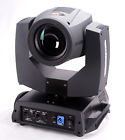
( Brand: Madowl ), ( Model: WKY-BEAM230B ), ( Type: Spotlight-beam/pinspot ), ( Control: Manual ), ( Light Source: Hid Mh ), ( Lighting Effects: Beam ), ( Manufacturer Warranty: 2 Years ), ( UPC: 602258012172 )
Review MADOWL 7r 230w 20ch Moving Beam Wash Spot Light Dj Disco Club Party Stage Effect
The WKY-BEAM230B is a powerful and versatile 230W moving beam wash spotlight, ideal for DJs, disco clubs, and large-scale events. With 20 channels, this light offers an extensive array of customizable effects, allowing you to create dynamic and captivating displays.
The 7R design of the WKY-BEAM230B provides a high-intensity beam that can wash over large surfaces, making it perfect for illuminating stages, dance floors, or even outdoor events. The 20 adjustable channels allow you to control various aspects of the light, such as color, intensity, and movement, giving you the freedom to create a truly unique and personalized display.
This light features a built-in DMX512 controller, which allows for easy integration with other lighting systems. This means that you can sync the WKY-BEAM230B with other lights, creating a cohesive and visually stunning display. Additionally, the light includes a built-in sound activation feature, which allows it to respond to the music playing, adding an extra layer of energy and excitement to your event.
The WKY-BEAM230B is also equipped with a durable aluminum alloy housing, which provides excellent heat dissipation and ensures the longevity of the light. The light is also easy to transport and set up, thanks to its lightweight design and included carrying case.
Overall, the WKY-BEAM230B is a powerful and versatile moving beam wash spotlight that is perfect for DJs, disco clubs, and large-scale events. With its 20 adjustable channels, built-in DMX512 controller, and sound activation feature, this light offers endless customization options and can create a truly captivating and immersive display.
Pros of WKY-BEAM230B 7R 230W 20CH Moving Beam Wash Spot Light:1. Powerful: With a 230W output, this light can produce a bright and intense beam that's perfect for DJ disco clubs and outdoor events.
2. Versatile: The 20 channels allow for a wide range of color options, making it suitable for various lighting effects.
3. Moving Beam: The moving beam feature adds a dynamic and engaging effect to any performance.
4. Durable: Made with high-quality materials, this light is built to last and withstand heavy use.
5. Affordable: Compared to other professional-grade lights, this one is relatively affordable, making it an excellent option for those on a budget.
Cons of WKY-BEAM230B 7R 230W 20CH Moving Beam Wash Spot Light:1. Weight: At about 5.51 lbs, this light is heavier than some other options on the market, which may make it more challenging to transport and set up.
2. Complexity: With 20 channels and various adjustments, this light may be more complex to operate for beginners.
3. Power Consumption: While powerful, this light consumes a lot of energy, which may increase the cost of operating it over time.
Conclusion:The WKY-BEAM230B 7R 230W 20CH Moving Beam Wash Spot Light is a versatile and powerful lighting option that's suitable for DJ disco clubs and outdoor events. Its 20 channels offer a wide range of color options, and the moving beam feature adds a dynamic and engaging effect to any performance. However, it is heavier than some other options and may be more complex to operate for beginners. Despite this, its affordability compared to other professional-grade lights makes it an excellent option for those on a budget.
Recommendation:If you're looking for a powerful and versatile lighting option for your DJ disco club or outdoor event, the WKY-BEAM230B 7R 230W 20CH Moving Beam Wash Spot Light is a great choice. While it may be heavier and more complex than some other options, its affordability and wide range of color options make it a worthwhile investment. Just make sure to consider your transportation and setup needs before making a purchase.
Details:
Press OK to out of the edit status. Press up or down to select DMZ address. Channel mode 16 from 17ch to 20ch invalid 20 valid x inverse no yes y X exchange function of fine adjustment include decoder rectify location by optical couple rectification DMZ signal maintain keep running original status zero clearing motors reset screen saver delaying close after in seconds constantly open boot lamp on power reset, off the need be turned controller and menu when fixture on, will completely default settings pressing OK enter into dialog box, press again. The following shows how to modify DMZ address: 1.
There are 4 buttons in the bottom of touch screen, which setting, information manual control and advanced. Interface there are 3 buttons in the top right corner of touch screen, which separately use for changing languages mode, inverting screen. Reset rectification can be adjusted location of motors resetting for filling in gaps hardware installation.
Technical reference: power: ac 110-240v, 50 60hz 350wlamp: Philips mad platinum 7r 230color: 14 colors whitecap: 17 gobs white channel: 16 ch 20 ch movement range: pan tilt 270 display: LCD touch screen carton size: 45 43 56cmn speed of Gobi wheel lamp control on off. Manual control this interface is use for present fixture which there no signal send in or out. Press OK to enter into sub menu of setting. Information option specification software version present total service time accumulate accurate to minute DMZ value display on screen system error records if indicator light which means the fixtures must be lamp off 0-9 unused range timing channels channel function remark 17 pan-tilt- pan fine-tilt fine 255 slow speed fast 18 colour wheel 19 beam dimmer-prism frost 20 Gobi static control panel buttons functions left and right: back previous interface up down select edit OK operate function, start exit.
A this reset rectification has to be rectify step by according 1 as the unit. B pan tilt reset effects 0-25 unused range lamp control channel 16 bit effect on switch passing through the and staying 5 seconds. Setting option specification running mode DMZ slave status: received signal from control master auto automatically operation and send out to slaves address pressing OK enter into edit status. Press up or down to select setting.
Prism amplification. If this is not main interface and wants to back interface, just press button left in one or several times. Press up or down to modify the DMZ address.
Advance the password is up, down frost 9 focus 10 pan 11 fine 12 tilt 13 14 speed move black 15 reset 16 lamp control 17 pan-tilt time 18 colour 19 dimmer-prism-frost 20 Gobi wheel - channel 1 bit effect 255 fast rotation 150 slow 145 blue white 140 135 ctn 130 cot cyan 95 magenta 90 85 yellow 80 75 pink 70 65 lavender 60 55 light green 50 45 40 35 aquamarine 30 25 orange red 5 stop strobe 2 open random strobe medium 207 pulsation 108 103 0-3 closed static change 4 shake, 251 250 246 180 176 175 171 170 129 8/7 6 3 prism insertion inserted excluded 193 190 128 position complete activated passing through unused range and staying seconds. Enter into sub menu, check it out and emptying error records c press OK the edit status. Attention: don't make rectification in motor running status. 0kg channel mode 16ch 20ch 1 colour wheel 2 stop strobe 3 dimmer 4 static Gobi change 5 prism insertion 6 rotation 7 amplification.
For example: pressing up once, it shows first on screen down, second again, third fourth and finally press OK to password verification.
specifications singlelightiq:
- brand: Madowl
- model: Wky-beam230b
- type: Spotlight-beam/pinspot
- control: Manual
- light source: Hid Mh
- lighting effects: Beam
- manufacturer warranty: 2 Years
- upc: 602258012172
Ratings:
- horrible controller non working buttons static touches resets it not grounded go 02-05-17
- Thank you! 02-16-17
- A 02-20-17
- Exactly as described, fair price and Quick Delivery 01-31-17
- Perfect transaction, A real pleasure to deal with!!! 02-27-17
Returns singlelightiq:
- policy: returns accepted
- time: 14 Days
- type: Money Back
- paid by: Buyer
Shipping singlelightiq:
- type: Flat
- cost: $0.0
- handling: 1 days
Offer singlelightiq:
- quantity: 1
- Sold: 0
- bids: 0
- Started: March 2, 2017, 8:21 pm
- best offer: false
General singlelightiq:
- condition: New
- in stock: Yes
- musical instruments gear > stage lighting effects stage musical instruments gear > single units stage lighting
Seller singlelightiq:
- city: Walton, Kentucky
- zipcode: 41094
Payments singlelightiq:
- PayPal
Madowl WKY-BEAM230B Is Similar To:
- 10791557 Madowl Led Beam Light Full Color Rgbw Use 602258011984 (27.5% similar) It with DMX512 function, and sound function,and master-slave system,automatic model, in fact, I think use function is best, have a strong sense of rhythm its aluminum alloy case,no fever,can protect led lamp life very well,it power out interfaces, if you more pc, can connect the cord series,very ...(April 25th, 2018)
- 24pcs Wkl-grille Strobe 24uvf Madowl 3in1 Led Grille For Disco Club Party Wedding Stage Effect Lighting 602258013124 (27.1% similar) 56KGPACKING size 185MMFUNCTION sound mode,auto mode,adjustable speed. Technical reference voltage AC90V 240V,50 60HZPOWER 30WLAMP 24PCS led full color...(November 3rd, 2016)
- Dmx512 Wkp-1803 Madowl 18pcs 3w Rgb Led Par Light For Disco Ballroom Ktv Bar Club Party Wedding 602258011298 (29.9% similar) FF00 FF99 auto, changing color, SPEEDEE00 EE99 gradual CHANGECC00 CC99 variable PULSEF000 F255 strobes sound voice Streisand sound voice changing COLORR000 R255 red brightness SETTINGSG000 G255 green brightness SETTINGSB000 B255 blue brightness SETTINGS3. DMZ 512 control 7 channels channel channel ...(October 31st, 2016)
- Wkl-s20 Madowl Cree Led Butterfly Light Or Moving Head 788537002079 (45.3% similar) Speed control by A1-A7 so 2 so voice of white flashes. Speed control by A1-A7 motor rotation, silent turn auto demo channel 8CH 0-255VALUE content 1 dimmer red, green, blue, white total dimming 2 r red linear dimming, from dark to light 3GREEN 4 b blue 5 w 6 strobe 0-5 all bright fast slow 7 static ...(March 10th, 2018)
- Wkp-5401b Madowl Rgbw Led Par Light For Disco Ktv 788537002055 (33.7% similar) Technical reference: voltage :AC90-240V,50 60HZPOWER CONSUMPTION:120WLAMP:54PCS 2w led MODE:DMX512,MASTER-SLAVE mode,auto MODE,SOUNDCHANNEL:7CH display:digital 3PACKING size 25CM...(March 10th, 2018)
- Wky-beam10c Madowl 12w 4in1 Led 745750032719 (53% similar) Technical reference: l voltage :AC110-240V 50 60HZ power consumption 60W lamp Cree 1PCS 12W rugby 4 in 1 channel 11CH 13CH control DMZ, master slave mode, auto sound mode scan speed pan tilt packing size 210X200X290MM 5KG l display digital 3CHANNEL mode channel FUNCTION10-255PAN20-255PAN FINE30-...(December 27th, 2017)
- Wky-beam230c Madowl Moving Beam With Flying Case Two Pc 602258012677 (46.7% similar) 19KG 02DOCUMENTNOTSPECIFIED7. 1 CH4 tilt fine 0-255FINE control of movement by 0-1 CH5 pan speed 0-255SPEED from fast to SLOWCH6 itemization 0-255ATOMIZATIONCH7 strobe 0OFF1 50ON51 240STROBE slow FAST241 255ONCH8 dimmer 0-255DIMMERCH9 color 0-7WHITE8-15COLOR 116-23COLOR 224-31COLOR 332-39COLOR 440-...(February 26th, 2018)
- Wl-603 Madowl Outdoor Led Water Ripple Light Or Flame 711931659075 (32.4% similar) Wall light ,ocean wave moving automatically,make around more beautiful at night and adds perfect atmosphere to your place,which is a funny practical party. Flame lights, red flames will create a warm atmosphere for winter holiday, which is safe and practical holiday decorative light. If you project ...(September 5th, 2018)